I wanted notes from my calls without sending the audio of every meeting to someone else's servers. Apple silicon is fast enough to do the whole job on the Mac, so that's where it happens.
Transcribe is a macOS menu bar app that notices when you join a Google Meet, Microsoft Teams or Slack huddle call, transcribes it on your Mac, and saves the transcript as Markdown in a folder you choose. Audio never leaves the Mac.
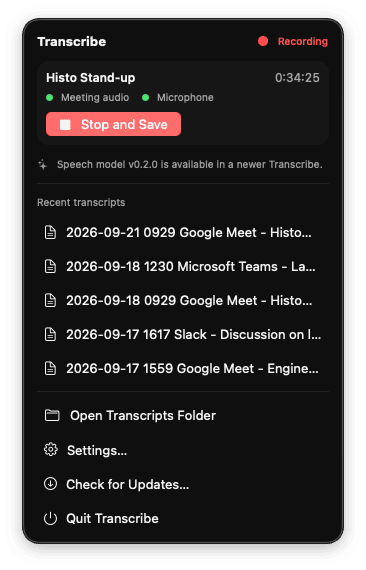
Every two seconds it asks Core Audio which processes have the microphone open. If it's Teams or Slack, that's a call. If it's a browser, it reads the tab list to find a Meet, Teams or Slack tab. The other participants are captured from a Core Audio process tap on the Mac's output and your side from the microphone, so the transcript knows who spoke without any diarization.
Audio is cut into roughly 30 second chunks at the quietest moment near each boundary and handed to Voz, which runs on the Neural Engine at about 100× realtime. The transcript is readable during the meeting and done within seconds of the end. When the call ends, Title writes a title and summary and Gist tags it with topics.
Those three come from Desert Ant, whose pitch is small specialised models that run on the device, one per task. That suits this app: no general purpose model to load, no prompt to coax, just a 467MB transcriber that does transcription and hands off. Adding a capability means adding another small model rather than asking a bigger one to do more, which is how I'd pick up Uhm for stripping filler words or Redact for taking personal information out of a transcript before it's shared.
Install with brew install --cask markcipolla/tap/transcribe. Requires an Apple silicon Mac on macOS 14.4 or later.



Mark lives and works on unceded Wurundjeri land in Naarm / Melbourne, Australia, and acknowledges the traditional custodians of the land on which he lives, paying respects to elders past and present, recognising the resilience, strength and pride of the Aboriginal and Torres Strait Islander communities.